
Updating RTKBase
From time to time, RTKBase updates are released, bringing improvements, new features, or bug fixes. In most cases, simply go to the SETTINGS tab, click the Check Update button, and confirm the update if one is available.
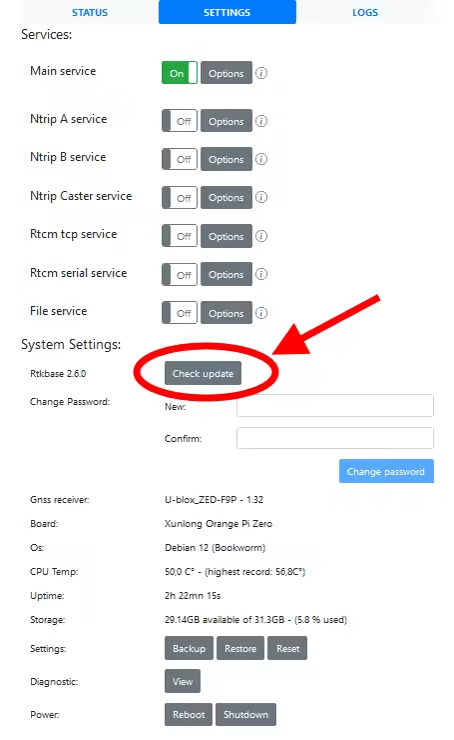
If you haven't updated for a long time, you may need to repeat this procedure several times to catch up with all the pending updates.
If the update is refused (Your OS is too old)
Don't panic!
This message means that the operating system running RTKBase is too old and also needs to be updated. The easiest way to do this is to:
- Back up your base settings using the Backup button, then turn it off by clicking the Shutdown button.
- Remove the microSD card from the base.
- Follow steps 2 to 6 on the Installation page.
- Restore your settings using the Restore button and selecting the backup file created earlier.
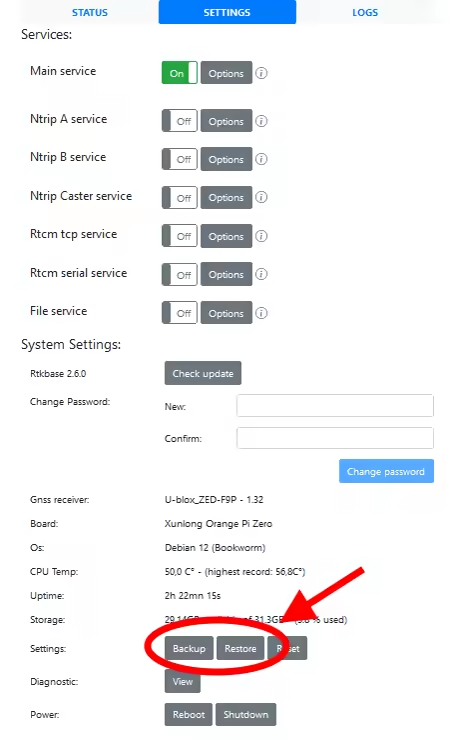
Reactivate the services you need, usually Main service and Ntrip A service.
And that's it! Your base is now running the latest version of RTKBase as well as the most recent version of the operating system.